
Virtual Assistant TIMS 2.0 (VAT)
一個整合至 WhatsApp 的 AI 聊天機械人
an AI-powered chatbot integrated into WhatsApp
- 隨時隨地,想問就問
Ask questions anytime, anywhere - 靈活、高效、生動嘅學習環境
Flexible, efficient, engaging learning environment
VAT 2.0 教師簡介影片
VAT 2.0 Teacher Introduction Video
VAT 2.0 教師指南
VAT 2.0 Teacher Guideline
開學前
Before Semester
– 教師會獲得一個 Google VTL 個人帳戶,以便使用 Google Drive 功能上載教學內容,此帳戶不受 Google Drive 容量限制。
(相關帳戶的電郵及密碼請與學校負責老師查詢)
- 上載課程描述和時間表(如有)
- 上載課堂筆記等教學內容
- 教師上傳基本教材後,我們會新成一個 Redeem Code 作為學生進入 WhatsApp 之後登記相應科目的方法,屆時教師須提供學生此 Redeem Code
(相應的上載資料夾可在「與我共用」Shared with me 中找到,建議新增至「已加星號專區」以便日後容易存取到)
– Teachers will receive a personal Google VTL account to upload teaching materials using Google Drive. This account is not subject to Google Drive storage limits.
(Please contact the school’s responsible teacher for the account’s email address and password.)
- Upload course descriptions and schedules (if applicable)
- Upload lecture notes and other teaching materials
- After teachers upload the basic teaching materials, we will create a new Redeem Code as a method for students to register for the corresponding subjects after logging into WhatsApp. Teachers will then need to provide this Redeem Code to students
(The corresponding uploaded folder can be found in “Shared with me”. It is recommended to add it to the “Starred” for easy access in the future.)
課堂中
During Lesson
– 教師只需使用個人電話或其他裝置錄製課堂錄音並放置於班房中較容易接收到老師聲音的位置例如班房中間的教師桌
– Teachers can simply use their personal phones or other devices to record classroom conversations and place them in a location in the classroom where the teacher’s voice can be easily heard
e.g. the teacher’s desk in the middle of the classroom

課堂後
After Lesson
- 上載課堂錄音
- 上載課堂筆記等教學內容
- 上載黑板上的內容(如需要)
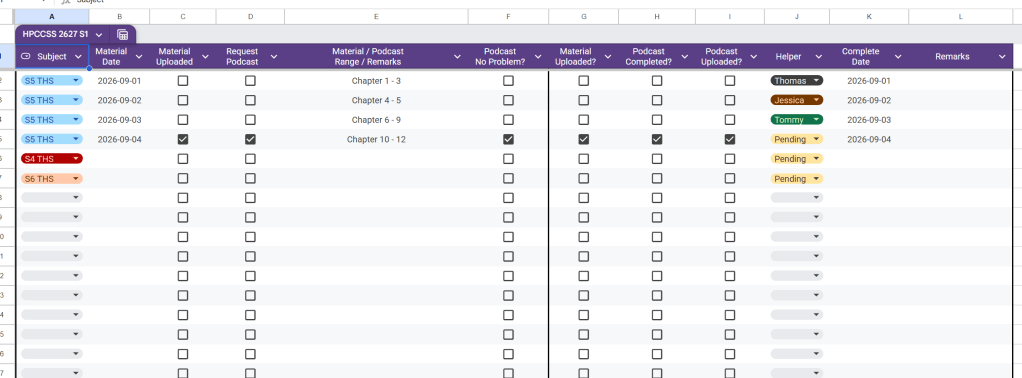
- 填寫 Google Sheet 上的資料以便通知工作人員上載資料至VAT 2.0 系統
- Upload lesson recording
- Upload lecture notes and other teaching materials
- Upload content from the blackboard (if needed)
- Fill out the information on the Google Sheet so that our staff can upload the materials to the VAT 2.0 system
上載須知
Upload Instructions
- VAT 2.0 系統不支援 pptx,建議事先另存為pdf,以方便工作人員處理
- 支援的格式包括:pdf, docx, txt, mp3, m4a
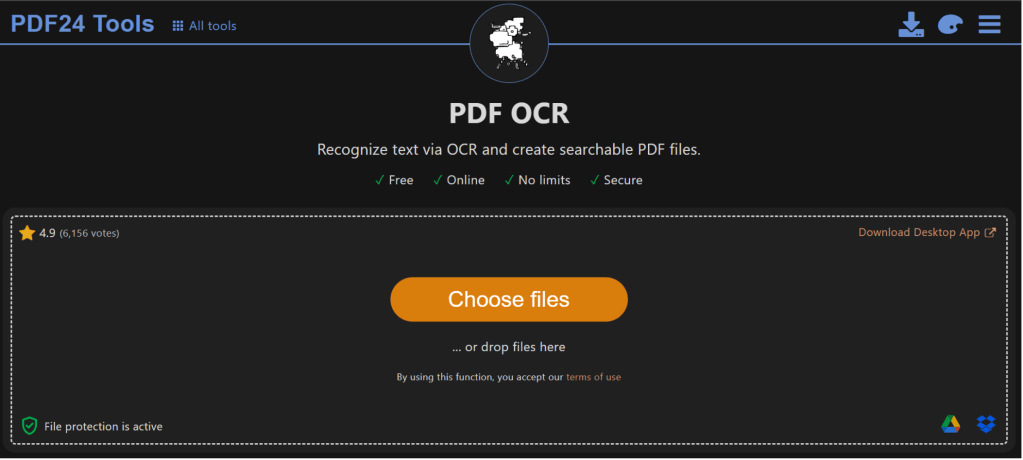
- 如教材是由Scanner掃描出來,請先使用以下網站進行OCR 處理後再上載
- 建議教師可用日期或課題單元命名檔案令資料夾更為工整
如 “2026-09-01 Chapter 1 Notes”
或以不同資料夾分類
- VAT 2.0 system does not support pptx files; it is recommended to save it as a PDF beforehand for easier processing by our staff
- Supported formats include: pdf, docx, txt, mp3, m4a
- If the teaching materials were scanned by Scanner, please use the following website to perform OCR processing before uploading
- Teachers are advised to name files by date or topic/unit to make folders more organized
For example, “2026-09-01 Chapter 1 Notes”,
or categorize by different folders
PDF 24Tools: https://tools.pdf24.org/en/ocr-pdf
播客功能
Podcast Feature
– 教師如需要播客功能, 請於上述Google Sheet 相關欄位勾選
– Podcast 功能支援中文及英文,視乎中文中學或英文中學
(中文及英文的引擎不一樣,所以內容也會不一樣)
– 播客功能一般建議每一個教學單元才做一個, 而不是每課節計算
– 老師可選擇是否先審視內容才讓學生看到
(如無特別指示,工作人員會於播客完成三天後上傳至 VAT 2.0 系統)
– Teachers who require podcast functionality should check the relevant box in the Google Sheet above
– The podcast feature supports both Chinese and English, depending on whether it’s CMI or EMI
(The engines for Chinese and English are different, so the content will also differ.)
– It is generally recommended to create one podcast per teaching unit, rather than calculating it per lesson.
– Teachers can choose whether to review the content before showing it to students
(Unless otherwise specified, our staff will upload the podcast to the VAT 2.0 system three days after completion.)

如何指導學生使用VAT2.0
How to guide students in using VAT2.0
– 教師可直接向學生展示APSS CSD網站,網站上有關於 QEF 的導覽選單,學生可瀏覽不同分頁了解 VAT 2.0,當中包括介紹影片及詳細的教學
– Teachers can directly show students the APSS CSD website, which includes a navigation menu about QEF. Students can browse different pages to learn about VAT 2.0, including introductory videos and detailed tutorials.
Website Link: https://apsscsd.com/qef-vat-home/
進階功能
Advanced features
– 每個學期結束後,我們會利用VAT 2.0 的人工智能生成一份報告分析學生的使用習慣、常見問題、教材質量
– 教師可於相應的 Google Drive 資料夾中找到課堂錄音的文字版以作參考
– 如有需要,教師可要求 暫停個別科目的 VAT 2.0 支援 例如考試時段
– At the end of each semester, we will use the VAT 2.0’s artificial intelligence to generate a report analyzing students’ usage habits, common problems, and quality of teaching material
– Teachers can find the transcript of the lecture recording in the corresponding Google Drive folder for reference
– If necessary, teachers may request the suspension of VAT 2.0 support for individual subjects, such as during exam periods

